Instagram comments can be annoying and sometimes even detrimental to your online reputation. Turning off comments on Instagram can help you maintain a more positive and controlled social media presence. In this article, we will explore various methods to disable comments on Instagram, whether it’s for all posts, before or after posting, on Instagram Live, Stories, Reels, and more. We will also discuss additional features like reporting, limiting, and blocking comments to further manage your Instagram comments section effectively.
Key Takeaways:
- To turn off comments on Instagram, you can use different methods such as disabling comments for all posts, before or after posting, on Instagram Live, Stories, and Reels.
- Unfortunately, Instagram does not provide a built-in feature to turn off comments on all posts at once, but third-party tools like Statusbrew can help automate the process.
- You can turn off comments on a specific Instagram post before publishing it by adjusting the advanced settings.
- If you have already posted a photo or video on Instagram and want to disable comments, you can do so by accessing the post settings.
- During Instagram Live broadcasts, you can turn off commenting to have a more streamlined session.
How to Turn Off Instagram Comments For All Posts At Once?
While it may be frustrating that Instagram doesn’t offer a built-in feature to disable comments on all posts at once, there is a solution that can save you time and effort. Enter Statusbrew, a third-party tool that allows you to automate the process of hiding or deleting comments for all your Instagram posts.
With Statusbrew, you can set up rules to turn off comments for all incoming Instagram comments on multiple posts simultaneously. This means you no longer have to manually moderate each comment, giving you more control over your comment section.
By leveraging Statusbrew’s advanced settings, you can easily manage your Instagram comments in a streamlined way. Simply follow these steps:
- Sign up for a Statusbrew account.
- Connect your Instagram account to Statusbrew.
- Navigate to the “Automation” section in Statusbrew.
- Create a rule to hide or delete comments based on your preferences.
- Apply the rule to all your Instagram posts.
By implementing this automation, you can focus more on creating compelling content and engaging with your audience, rather than spending time moderating individual comments.
Take control of your comment section with Statusbrew
Statusbrew provides Instagram users with the ability to manage their comments more efficiently. With this tool, you can:
- Automate the process of hiding or deleting comments on your Instagram posts.
- Create custom rules to turn off comments based on specific criteria.
- Save time and effort by moderating comments in bulk.
- Maintain a positive and controlled social media presence.
With Statusbrew, you can ensure that your Instagram comments section aligns with your brand’s image and values. Say goodbye to the hassle of individually moderating comments and hello to a more streamlined approach.
How to Turn Off Comments On Instagram Before Posting?
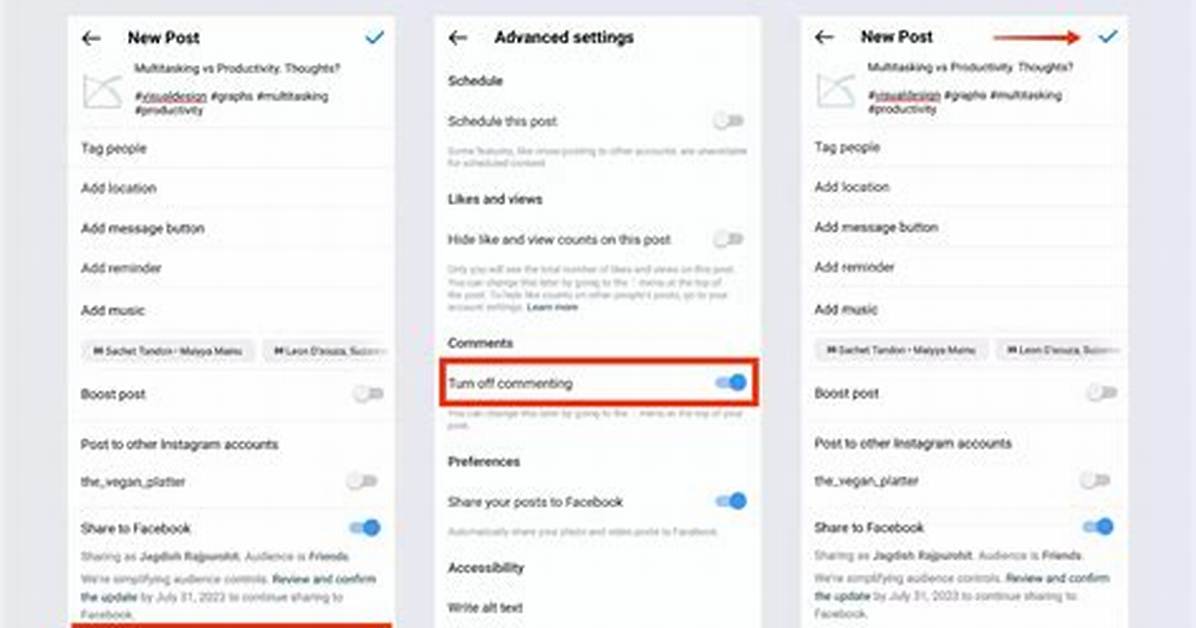
If you want to have more control over the conversation surrounding your Instagram posts, you have the option to disable comments on a specific post before publishing it. By turning off the commenting toggle in the advanced settings, you can prevent users from leaving comments on your post right from the moment it is shared. This feature is particularly useful when you anticipate receiving unwanted or unnecessary comments on a particular post.
Disabling comments on Instagram before posting allows you to curate your content without the interference of user-generated comments. Whether you want to share a personal moment, promote a product or service, or express your creativity, turning off comments can help you maintain a more controlled and focused online presence.
By disabling comments before posting, you can also prevent any potential negative or harmful comments from appearing on your post, protecting your mental well-being and maintaining a positive atmosphere on your Instagram profile.
Step-by-Step: How to Turn Off Comments On Instagram Before Posting
- Open the Instagram app on your mobile device.
- Create a new post by tapping the “+” icon at the bottom center of the screen.
- Select the photo or video you want to post from your gallery or capture a new one.
- Apply filters, edit the post, and add a caption as desired.
- Tap on the “Advanced Settings” option located at the bottom of the screen.
- Toggle the “Turn Off Commenting” switch to the right to disable comments on the post.
- Review your post and make any necessary adjustments.
- Tap “Share” to publish your post without comments.
Once you’ve successfully turned off comments before posting, users will not be able to leave comments on that specific post. This provides you with greater control over the content and conversation happening on your Instagram profile.

